BLOG ARTICLE
Faceless Tech Review Channels: How to Start 2026

Faceless tech review channels combine a high-paying niche with a format that doesn’t require you on camera. Viewers searching for software tutorials, app reviews, or “best X” comparisons care about clear demos and honest recommendations, not who’s speaking. Tech advertisers (SaaS, hardware, productivity tools) pay premium CPMs because their audiences have strong buying intent. This guide covers why the tech niche pays, content ideas and formats, real channel examples, how to create tech review videos with screen recording and AI voiceover, monetization, and growth so you can start a faceless tech review channel in 2026.
TL;DR
- Tech is a high-CPM niche. Technology and software tutorials typically earn $10–$20 CPM, so tech review channels often earn several times more per view than gaming or entertainment. Tier-1 audiences (US, UK, Canada, Australia) command the best rates.
- Screen recording is the natural format. Viewers want to see the product or software in action. OBS Studio and similar tools let you record your screen with voiceover, so you never need to appear on camera. Tutorials, comparisons, and walkthroughs fit this format.
- Content ideas that perform: Software tutorials, app reviews, “best X for Y” lists, hardware comparisons, and how-to guides. Evergreen topics (e.g. “how to use OBS,” “best free editing software”) keep attracting search traffic long after upload.
- Monetization beyond ads: Amazon Associates and SaaS affiliate programs (Canva, editing tools, SEO software) fit tech reviews. Sponsorships from software and hardware brands often pay $15–$25 CPM or more for integrated segments.
- No face required. Channels like Brett in Tech show that faceless tech tutorials and reviews can build large audiences and strong affiliate and sponsor revenue when the recommendation is genuine and the link is easy to find.
Why the Tech Review Niche Pays Well
Tech content attracts advertisers with strong budgets. Software companies, hardware brands, and productivity tools value viewers who are actively comparing options or learning how to use a product. A viewer who signs up for a SaaS trial or buys a gadget through your link can be worth hundreds of dollars, so these advertisers bid more for ad space on tech videos. As a result, technology and software tutorial CPM often sits in the $10–$20 range, while gaming or broad entertainment often earns $2–$6 CPM. Geography matters: content that reaches viewers in the US, UK, Canada, and Australia earns more per view. If you’re choosing or refining your niche, tech is among the strongest options for ad revenue and for affiliate and sponsorship deals.
Sub-niches within tech
Not all tech topics pay the same. Software tutorials (productivity, editing, design), app reviews, and “best X” comparisons often sit at the high end. Hardware reviews (laptops, peripherals, gadgets) and gaming-adjacent tech can still earn well. Picking a sub-niche you can sustain (e.g. “free software for creators” or “best budget laptops”) helps you rank for specific searches and attract the right advertisers without competing with every generic tech channel.
Content Ideas and Formats That Work
Tech audiences search for answers: how to use a tool, which app to choose, how to set something up. Evergreen tutorials and comparisons stay relevant year-round and keep attracting views long after upload. That fits faceless production: you record your screen, add a voiceover (your own or AI), and publish without ever showing your face.
Strong content angles for faceless tech review channels:
- Software tutorials: Step-by-step guides for OBS, Canva, editing software, or any app. Screen recording plus clear narration is enough. Use chapters so viewers can jump to the step they need.
- App and software reviews: “Best free video editor 2026,” “Canva vs Figma for beginners,” or “Is this app worth it?” Show the product in action, list pros and cons, and keep the tone honest so viewers trust your recommendation.
- Comparisons and lists: “Best laptops under $500,” “Top 5 tools for podcasters,” or “X vs Y: which is better?” List-style and comparison videos often attract strong search traffic and align well with affiliate programs.
- How-to and setup guides: “How to record your screen on Windows,” “How to set up OBS for streaming,” or “How to remove background in Photoshop.” How-to content is highly searchable and fits screen recording perfectly.
Videos of 8 minutes or longer allow mid-roll ads and tend to earn more per view. Use a clear structure and chapters so viewers stay longer; that helps both revenue and the algorithm.
Successful Faceless Tech Channels: Real Examples
These channels show how tech content can work without a face on camera. They use screen recordings, voiceover, and clear structure to teach and recommend.
Brett in Tech delivers faceless tutorials and tech reviews. The format is straightforward: screen capture or B-roll of the product, plus a clear voiceover that walks viewers through features, setup, or comparisons. The channel focuses on software, apps, and productivity tools, which keeps attracting viewers in a buying or research mindset. That audience is valuable to both advertisers and affiliate programs. Tech channels in this style can attract sponsorships from software and hardware brands, with CPMs often in the $15–$25 range for integrated segments.
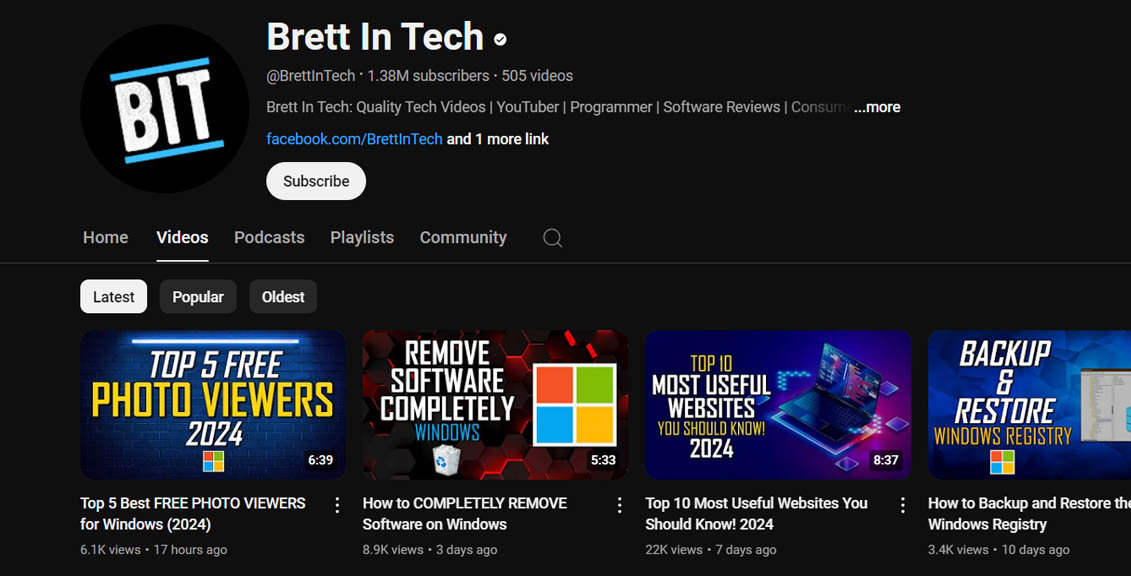
What channels like this share: a clear niche, consistent format (screen + voice), and focus on value and clarity rather than personality. You can adopt a similar approach with screen recording and AI voiceover or your own voice.
How to Create Tech Review Videos Without Showing Your Face
You don’t need a camera. Tech faceless videos are built from screen recording, a script, and a voice (your own or AI).
Screen recording: The default format for software tutorials, app walkthroughs, and demos. OBS Studio is free and widely used: you capture your screen (or a window), add a microphone or AI voiceover, and edit in a tool like Clipchamp or CapCut. Keep the screen clean (close unrelated tabs, use a clear resolution) and speak at a steady pace so viewers can follow. For “best X” or comparison videos, you can alternate between screen clips and B-roll from stock libraries (Pexels, Pixabay) to add variety.
Voiceover: Your own voice is enough if the audio is clear. If you prefer not to record, use an AI voice generator that matches the tone of your content (calm and instructional works well for tech). Consistency in tone and pacing matters more than a “perfect” voice.
Editing: Add chapters, on-screen text for key steps, and a clear intro that delivers on the title (e.g. “In this video I’ll show you how to…”). Short retention spikes (e.g. a quick cut or a highlighted cursor) can help keep viewers engaged. If you’re new to faceless video production, start with one format (e.g. screen recording + voice) and refine it before adding more.
Stock footage (optional): For list videos or “best X” content, you can mix screen recordings with B-roll from Pexels or Pixabay (e.g. people using laptops, close-ups of devices). Don’t overuse generic clips; the core value in tech reviews is showing the product.
Monetizing Your Faceless Tech Review Channel
Tech channels can earn from several streams. Ads are the obvious one: once you’re in the YouTube Partner Program, long-form tech content typically earns $8–$15 RPM or more depending on sub-niche and audience location. Many successful tech creators also rely on affiliate marketing and sponsorships.
Affiliate marketing: Amazon Associates works well for hardware, cables, and gadgets you review. SaaS and software programs (Canva, editing tools, SEO tools, hosting) often offer recurring commissions: one referral that stays subscribed can earn you money every month. When you recommend a tool you’ve shown in the video, put your affiliate link in the first lines of the description and in a pinned comment. Disclose affiliate links clearly; the FTC expects that viewers see the relationship before they click.
Sponsorships: Software and hardware brands look for channels with the right audience. Tech sponsorship CPMs often sit in the $15–$25 range, so a dedicated sponsor segment or integration can match or exceed ad revenue per video. Pitch with a short media kit (audience, views, past work) and keep sponsorships relevant to your content so your audience trusts the recommendation.
Digital products: If you build authority, you can sell courses, templates, or presets (e.g. for editing or streaming). These work best when they extend what you already teach for free on the channel.
Diversifying across ads, affiliate, and sponsorships smooths out swings in any one source and is a common approach for faceless channel monetization.
Growing Your Tech Review Channel
Growth comes from discoverability and retention. Keyword research helps you find topics people search for (e.g. “best free screen recorder” or “how to use OBS”) so you can create videos that rank. Use tools like Ahrefs’ YouTube keyword tool or similar to see volume and competition; then target clear, specific titles and descriptions.
Hooks and structure: The first 10–30 seconds should deliver on the thumbnail and title. State what you’ll show or compare, then walk through it step by step. Use chapters so viewers can jump to what they need and so the algorithm can understand the video.
Consistency: Posting on a schedule (e.g. one or two long-form videos per week) helps the algorithm and builds habit with your audience. Batch scripting and recording so you can keep publishing even when you’re not “in the mood.”
Shorts and funnels: Shorts earn much less per view than long-form in tech, but they can introduce your channel to new viewers. Use Shorts to tease a tip or a “best X” take and point viewers to a full video on your channel for the full review or tutorial.
Frequently Asked Questions
Is the tech niche good for faceless YouTube channels?
Yes. Tech is a high-CPM niche, and viewers often care more about seeing the product or software in action than about seeing the creator. Screen recordings, tutorials, and comparison videos work well without you appearing on camera. Channels like Brett in Tech show that faceless tech reviews and tutorials can build large audiences and strong affiliate and sponsor revenue.
How much do faceless tech channels make?
Earnings depend on views, sub-niche, and audience location. Technology and software tutorial CPM often sits in the $10–$20 range, so RPM (what you earn after YouTube’s cut) is typically $5–$12 or more. A channel with 100K views per month on long-form tech content might earn roughly $500–$1,200 from ads alone, with more possible from affiliate and sponsorships.
Do I need expensive gear to start a tech review channel?
No. You need a computer, screen recording software (e.g. free OBS Studio), and a decent microphone or AI voiceover. Many successful faceless tech channels use only screen capture and voice. Upgrade your mic or editing setup later if you want; clarity and value matter more than production budget at the start.
What should I disclose on a tech review channel?
Disclose any sponsorship, affiliate relationship, or other compensation in the video and in the description. Use plain language (e.g. “This video is sponsored by…” or “Some links in the description are affiliate links”). The FTC’s endorsement guidance applies to tech reviews as well as other niches.
Which tech sub-niche has the highest CPM?
Software tutorials, SaaS and productivity tool reviews, and “best X for Y” content often command the highest CPMs. Hardware and gadget reviews can still earn well, especially when they target tier-1 audiences. General gaming tech sometimes pays a bit less than productivity and business software. Target US, UK, Canada, and Australia for the best rates.
Summary
Faceless tech review channels can earn more per view than most niches by focusing on clear, evergreen content that attracts high-value advertisers and affiliate programs. Choose a sub-niche you can sustain, use screen recording (e.g. OBS Studio) plus voiceover, and model what works for channels like Brett in Tech. Monetize through ads, affiliate marketing, and sponsorships, and disclose paid relationships clearly. With consistent, valuable content and the right growth and production approach, a faceless tech review channel can become a strong, long-term asset.